
GOES-2-Go Documentation#
GOES-2-Go is a python package that helps you download GOES-R series (GOES-East/16 and GOES-West/17/18) NetCDF files from the Amazon Web Services archive and provides RGB recipes for various RGB products.
Installation#
mamba install -c conda-forge goes2go
conda install -c conda-forge goes2go
pip install goes2go
Add goes2go to your uv project with the following command:
uv add goes2go
In some of the docs, you might see me use some functions I borrow from Carpenter Workshop
Capabilities#
Download and Read Data#
First, create a GOES object to specify the satellite, data product, and domain you are interested in. The example below downloads the Multi-Channel Cloud Moisture Imagery for CONUS.
from goes2go import GOES

# ABI Multi-Channel Cloud Moisture Imagry Product
G = GOES(satellite=16, product="ABI-L2-MCMIP", domain='C')

# Geostationary Lightning Mapper
G = GOES(satellite=17, product="GLM-L2-LCFA", domain='C')

# ABI Level 1b Data
G = GOES(satellite=17, product="ABI-L1b-Rad", domain='F')
Note
A complete listing of the products available are available at here.
There are methods to do the following:
List the available files for a time range
Download data to your local drive for a specified time range
Read the data into an xarray Dataset for a specific time
# Produce a pandas DataFrame of the available files in a time range
df = G.df(start='2022-07-04 01:00', end='2022-07-04 01:30')
# Download and read the data as an xarray Dataset nearest a specific time
ds = G.nearesttime('2022-01-01')
# Download and read the latest data as an xarray Dataset
ds = G.latest()
# Download data for a specified time range
G.timerange(start='2022-06-01 00:00', end='2022-06-01 01:00')

# Download recent data for a specific interval
G.timerange(recent='30min')
RGB Recipes for ABI#
Generate RGB arrays for different RGB products. Check out the following notebook for a demonstration:

ABI TrueColor RGB image
Field of View#
Advanced Baseline Imager (ABI)#
GOES-West is centered over -137 W and GOES-East is centered over -75 W. When GOES was being tested, it was in a “central” position, outlined in the dashed black line. Below is the ABI field of view for the full disk:
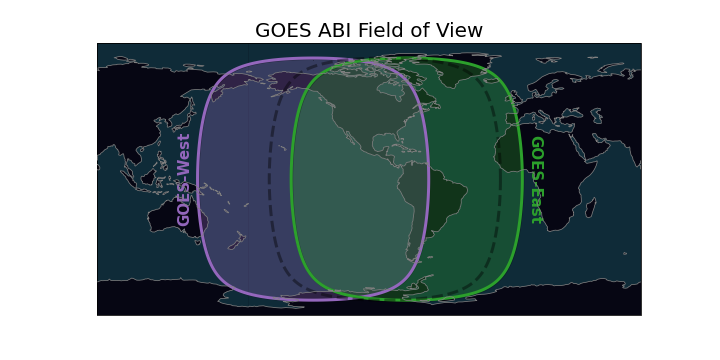

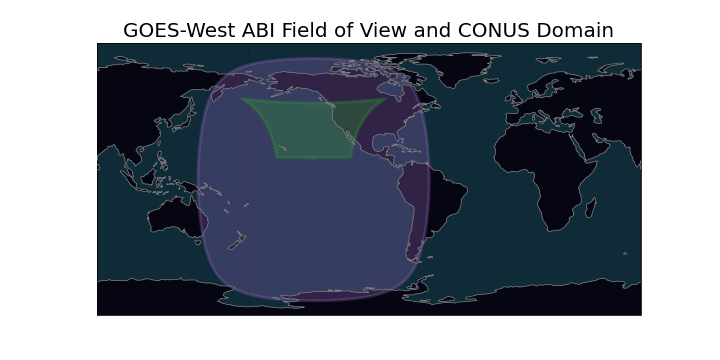
ABI full disk field of view#
Geostationary Lightning Mapper (GLM)#
The GLM field of view is slightly smaller and limited by a bounding box. The field of view can be estimated.

Approximate GLM field of view#
Useful Links#
🐍 glmtools For useful tools for GLM data.
⏲ Mesoscale Sector Historical Archive shows maps of where mesoscale scans were at each time.
💾 Data Access#
Access GOES data through NOAA’s Big Data Project partners
-
Microsoft Azure (Only GOES-16??)